
Where Was This Photo Taken?
Upload a photo and let AI find where it was taken. Our image geolocation analyzes landmarks, architecture, roads, vegetation, and other geographic clues to estimate the most likely location.
Drop your photo here
or click to upload
JPG, PNG, WEBP, HEIC • Max 10MB
Not sure what to upload? Try one of these:
- AI-Powered Geolocation
- Evidence-Based Reasoning
- No GPS Required
Where Was This Photo Taken? AI Photo Location Analysis Example
See how AI analyzes visual geographic clues to identify a photo's most likely location, including the prediction, confidence score, and evidence behind the photo.
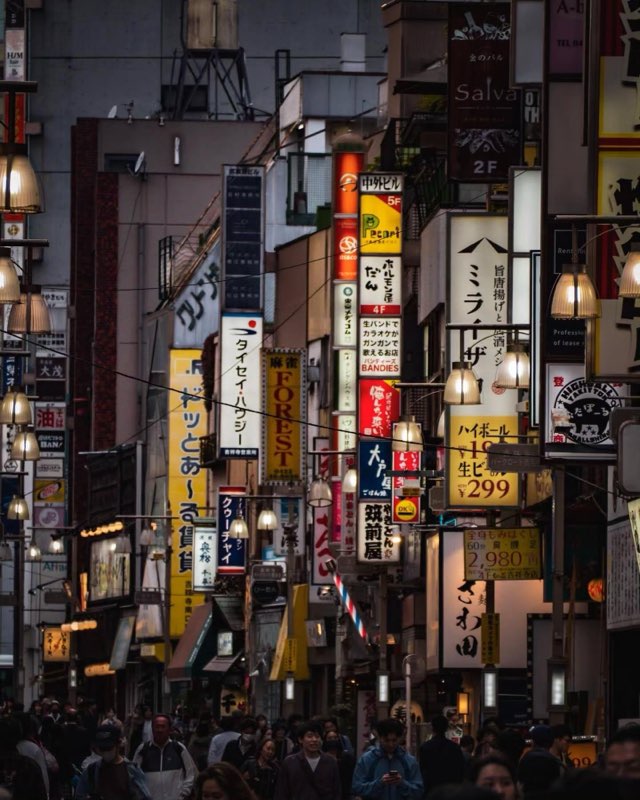
Tokyo, Japan
Key Location Clues
- Japanese Script
- Vertical Signage Density
- Highball Price Sign

Dhaka Division, Bangladesh
Key Location Clues
- Jatiya Sangsad Bhaban
- National Flag
- Clothing
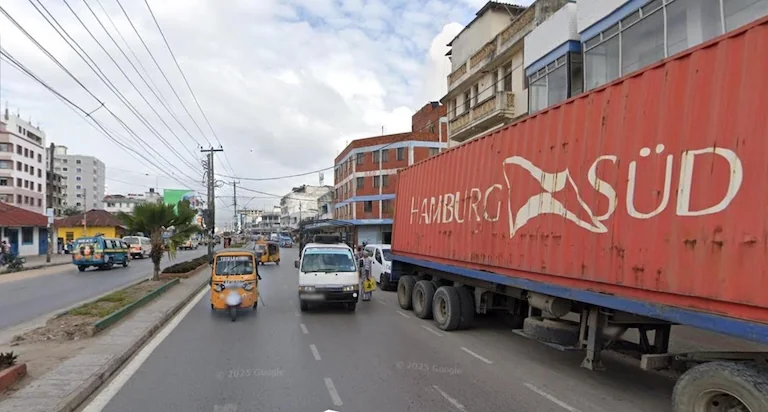
Dar es Salaam Region, Tanzania
Key Location Clues
- Hamburg Süd Container
- Tuk-tuks (Bajajis)
- Urban Buildings
How AI Finds Where a Photo Was Taken
Our AI analyzes visible geographic clues in your photo and combines them with global location knowledge to estimate where the image was taken.
1. Upload Your Image
Upload a photo, screenshot, or GeoGuessr round to start the AI location analysis.
2. Analyze Visual & Geographic Clues
AI analyzes landmarks, architecture, roads, signs, landscapes, and environmental details to identify geographic patterns.
3. Determine the Most Likely Location
AI uses geographic context and patterns to estimate the most likely country, region, or city.
4. Explore the Location Evidence
View the predicted location with confidence score, map, and the evidence behind the prediction.
What You'll Get from AI Photo Location Analysis?
AI provides the most likely location, confidence score, and geographic evidence behind the prediction, helping you understand why the photo matches a specific place.
Estimated Location
View the predicted country, region, city, and coordinates based on AI image geolocation analysis.
Visual Geographic Evidence
Explore the landmarks, architecture, roads, landscapes, and other clues used to estimate the location.
Location Confidence
See the confidence level of the prediction and understand how reliable the result is.
Possible Locations
Explore other locations considered by AI during the analysis.
Interactive Map
View the estimated location on a map and explore the surrounding area.
What Geographic Clues Does AI Use to Identify a Location?
Recognizable landmarks, building styles, and architectural patterns can provide strong clues about where a photo was taken.
Landmarks & Architecture
Recognizable landmarks, building styles, and architectural patterns can provide strong clues about where a photo was taken.
Roads, Signs & Languages
Road signs, traffic markings, street names, and visible text can reveal countries, regions, and local languages.
Landscape & Natural Environment
Vegetation, terrain, mountains, coastlines, and climate patterns help narrow down geographic regions.
Infrastructure & Urban Details
Road design, utility poles, buildings, and infrastructure styles reveal regional characteristics.
Lighting & Environmental Details
Shadows, sunlight, and surrounding environmental details provide additional location clues.
What Types of Photos Work Best for Location Identification?
AI image geolocation works best when photos contain visible geographic information. Travel photos, street scenes, landmarks, screenshots, and outdoor images usually provide more clues for identifying a location.
Travel Photos
Identify locations from vacation photos, scenic views, and places you visited but no longer remember.
Street & City Scenes
Analyze streets, neighborhoods, and city views shared from messages or online platforms.
GeoGuessr & Street View Screenshots
Find possible locations from GeoGuessr challenges, Google Street View screenshots, and map images.
Landmarks & Famous Places
Identify famous landmarks, buildings, monuments, and unique places shown in photos.
Historical & Personal Photos
Explore old family photos or historical images when they contain recognizable locations or environmental clues.
AI Image Location Finder vs Reverse Image Search
Reverse image search finds identical images that already exist online. AI photo location analysis works differently by examining visual clues such as landmarks, architecture, roads, and landscapes to estimate where a photo was taken.
Goal
Reverse Image Search
Find the same image
AI Photo Location Finder
Find where the photo was taken
Data Source
Reverse Image Search
Matches images available online
AI Photo Location Finder
Analyzes visual geographic clues
Requires Online Presence
Reverse Image Search
Usually yes
AI Photo Location Finder
No
Analysis Method
Reverse Image Search
Image similarity matching
AI Photo Location Finder
Landmarks, architecture, environment, and geographic patterns
Result
Reverse Image Search
Image sources and similar images
AI Photo Location Finder
Estimated location with supporting evidence
| Reverse Image Search | AI Photo Location Finder | |
|---|---|---|
| Goal | Find the same image | Find where the photo was taken |
| Data Source | Matches images available online | Analyzes visual geographic clues |
| Requires Online Presence | Usually yes | No |
| Analysis Method | Image similarity matching | Landmarks, architecture, environment, and geographic patterns |
| Result | Image sources and similar images | Estimated location with supporting evidence |
Frequently Asked Questions
Explore Related Resources
Discover more AI-powered tools and guides to identify photo locations, recognize landmarks, read EXIF metadata, check geotags, and solve GeoGuessr screenshots.
Find Location from Photo
Upload a photo or screenshot and let AI analyze visual clues to estimate where it was taken without GPS metadata.
Try ToolGeoGuessr Image Solver
Analyze GeoGuessr screenshots with AI and identify possible locations using roads, signs, landscapes, and geographic clues.
Try ToolIdentify Landmarks from Photos with AI
Upload a photo to recognize landmarks, buildings, monuments, and famous places with AI location analysis.
Try ToolEXIF Data Viewer
View EXIF data from photos online. Extract camera settings, lens information, ISO, aperture, shutter speed, and GPS location.
Try Tool
Find the Location Behind Your Photo
Upload your image and let AI analyze geographic clues to reveal the most likely location with supporting evidence.